




Got a tip for us?

Featured

Looking to get an iPhone for cheap? Here are some useful tips for saving the most money when you buy an Apple iPhone.
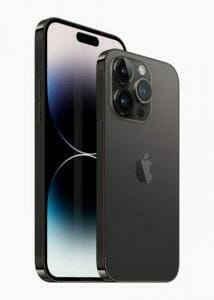
iPhone 14 Pro and iPhone 14 Pro Max are shown in space black.

Apple’s iPhones are some of the best phones you can buy. But they’re also pretty expensive. A few tips and tricks can help the smart shopper figure out how to get an iPhone for cheap.

Here are seven ways you can save, as recommended by our experts.

1. Specify Needed Features and Set a Budget

Once you start looking for deals, it’s easy to get "deal blindness." That’s when you end up spending a few hundred dollars more for more storage space, or getting a Pro model instead of a standard models just because you found a good deal on the Pro. Remember, the best deal available isn’t necessarily the perfect choice for you.

Before you start looking around, ask yourself which iPhone you should get. You should also figure out what specifications you need. Write down the reasons you want those particular specifications or features. For example, "I want an iPhone Pro model because of additional camera features."
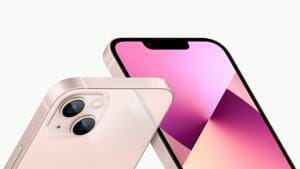
The TrueDepth camera system and the redesigned rear camera layout of iPhone 13 in pink.

Similarly, before you start, figure out a budget. Write down why you have chosen that budget, and how flexible you can be with it.

These two reminders are crucial because the moment you see deals, you’ll be tempted to spend a little extra or buy more than what you need. But the smart shopper knows that the phone itself isn’t the only part of the iPhone experience. Instead, you could spend that money on other items like the AppleCare Plus.

2. Buy Preloved And Still Usable iPhones

The next tip is for those content with getting a pre-loved gadget: buy a second-hand iPhone. You might be pleasantly surprised by the quality and range of pre-owned iPhones available, from brand-new to lightly used. Apple iPhones are made of premium materials. It’s well-known that iPhones hold their resale value because of this, so it’s safer to buy a refurbished or used iPhone compared to other smartphones. Generally, your options come down to one of three choices.

Buy from Apple’s official refurbished store: Apple takes faulty iPhones returned by owners, fixes them up, and sells them as refurbished units. Since they’re not brand-new phones, they come with a discount that puts them at 10-20 percent lower than the retail price. These refurbished units are tested extensively and Apple guarantees they will work as efficiently as a new model. They’re also backed by a one-year warranty.

Buy used and tested iPhones from resellers:Some stores purchase used iPhones from owners, fix them up and run extensive tests, then resell them. These stores offer their own warranty, not Apple’s. These are significantly cheaper than official refurbished iPhones from Apple.

Buy used iPhones directly from owners: This is the riskiest option, and we recommend avoiding it. There is no warranty offered, and you’re on your own if you get scammed. iPhones are expensive products, so it probably isn’t worth the risk. The upside is that you’ll probably get the cheapest deals this way.

When buying second-hand or refurbished iPhones, testing the device thoroughly before striking a deal is essential. Here are some important questions to ask when checking a pre-owned iPhone for sale:

  • Does it turn on immediately?;
  • Does it still have a passcode enabled?;
  • Is the previous owner’s private information wiped out?;
  • Do the speakers and microphone work fine?;
  • Are there any dead pixels on the display?;
  • What’s the maximum battery capacity?;
  • Is there visible physical damage that may hinder performance?; and others.

These questions are important to ask while checking a pre-owned phone for sale. Securing a low-cost iPhone is your goal but ensure its performance and quality match the price.

3. Put Up Your Current Phone For Sale or Trade

If you already have an iPhone, you can either get a trade-in deal when buying a new iPhone or sell it online yourself. While it might be hard to part ways with your reliable sidekick, selling or trading in your current phone could dramatically reduce how much you’re going to pay for your next iPhone’s.

Trading in your old device directly with Apple or through mobile carriers could knock off hundreds from your new phone’s price tag. Private sales on platforms online are viable options where you might fetch a higher price too.

Remember to follow the checklist above when selling or trading your phone. Your potential customer may also be looking for a great deal and won’t want to pay so much for a half-decent device.

4. The Best Deals Aren’t Always at the Apple Store

You can purchase an iPhone from an Apple Store retail outlet or Apple’s online store, but expect to pay the sticker price. However, if you buy from an authorized Apple reseller like Amazon, you’ll often find discounts. For example, you can get an Apple iPhone for less than the retail price.

A different approach is to visit your mobile carrier, especially if you’re worried about encountering stolen or blacklisted iPhone units.

Mobile carriers compete for your attention and loyalty. They’re frequently releasing sweet deals and enticing promos, which could make your iPhone purchase less of a financial sting.

Such deals may include contract sign-ups, trade-in offers, or even free devices with specific plans. Research thoroughly, compare offers, and don’t hesitate to negotiate. You might land a deal that makes your iPhone dreams more affordable.

5. Subscribe To Payment Plans

Once you’ve found a promo from your carrier, subscribe to a payment plan. It’s a savvy choice for those reluctant to pay a lump sum upfront. Apple and some carriers offer monthly plans that spread the payment cost of your new iPhone over several months or even years. These plans include benefits like warranties and free annual upgrades.

Remember, though, to read the fine print carefully. Although the monthly instalments might seem manageable, consider the long-term cost, which could be higher than buying outright.

6. Get An Older Or Smaller Model

To keep costs down, consider an older or smaller model. With each iPhone iteration, older models tend to drop in price, but they still pack a solid tech punch. An older model could be your best bet if you don’t need the latest camera or the fastest chip.

Similarly, smaller models like the iPhone SE or the Mini versions offer the full iPhone experience at a smaller price. They come with impressive features, snappy performance, and a compact design.
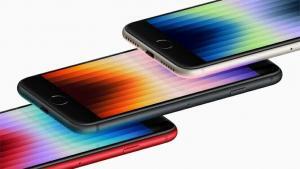
Angled shot showing the display of the third generation iPhone SE in (PRODUCT)RED, midnight, and starlight.  

7. Buy at the Right Time

If you buy a new phone, you certainly won’t want to see a new model released a week after your purchase. Thankfully, Apple is generally quite predictable when it comes to new iPhone releases, so it’s easy to predict when the new model will hit shelves.

The MacRumors Buyer’s Guide has always-up-to-date information that provides a snapshot of:

  • Number of days since the current model was released
  • Average number of days between models
  • Number of days between all recent releases of that product line
  • Rumors about the new product and what features it will have
  • Ratings: Buy Now, Neutral, Caution, Don’t Buy

Once you know when the new model will release, make a decision on whether you want to wait or not. Typically, the current models in a product line drop in price after the new models come out. So you can stick to your original budget and buy the new product, which saves money on upgrading later. Or you can buy the previous-gen model and save a few hundred dollars.

If you’re after the features, consider the models that are only a few years old. In fact, there are older models that can run the latest iOS version – allowing you to enjoy the newest Apple features with a slightly cheaper device.

Get A New iPhone For Less

Owning an iPhone doesn’t necessarily mean emptying your wallet. You have multiple ways to save money on your next iPhone purchase; these tips are some of the most effective. The crucial factor is understanding what works best for you and your budget.

The next time you’re eyeing the latest iPhone, remember: a savvy purchase could save you a pretty penny without compromising your tech cravings. Now, isn’t that a fantastic deal?
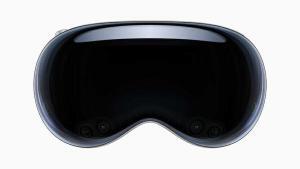
It’s no doubt Apple Vision Pro is extremely expensive. So, Why is it so pricey? Lets find out

During the June 2023 WWDC event, Apple made jaws drop when it announced that its newest product, the Vision Pro AR/VR "mixed reality" headset, would start at $3,499.00.

At $3,499, Apple’s Vision Pro costs more than three weeks worth of pay for the average American, according to Bureau of Labor Statistics data. The Vision Pro is also far more expensive than rival headsets, such as Meta’s $499.99 Quest 3, and the $999.99 Meta Quest Pro.

It tops many other Apple products in terms of price too. Buying an iPhone 14 Pro Max, a 12.9-inch iPad Pro and an Apple Watch Ultra would still be cheaper than an Apple Vision Pro (although it comes fairly close.) Shipments of virtual and augmented reality headsets also plummeted in 2022, according to International Data Corporation statistics published in March, adding to the skepticism.

A close-up of Apple Vision Pro.  

In an interview with ABC News’ Good Morning America, Apple CEO Tim Cook acknowledged the headset’s price when asked if the average person would be able to afford it.

"I think people will make different choices depending upon their current financial situation," he said.

To call Apple’s new headset expensive may be an understatement. But once you step back and look at the larger picture beyond the initial sticker shock, that eye-watering price starts to make a little sense.

The $3,499 price tag is leading many Apple fans to question: “Why does Apple Vision Pro cost so much?”

Reasons Why Apple Vision Pro Is So Expensive

High-Quality Hardware

One of the biggest factors contributing to the cost of the Vision Pro is the hardware. The device is packed with state-of-the-art components, each contributing to the overall user experience. From the high-resolution display and powerful processor to the advanced sensors and the cutting-edge haptic feedback system, each piece of hardware plays a crucial role in providing a seamless and immersive experience. These components are not cheap to produce, and their high cost is reflected in the price of the Vision Pro.

The first thing you’ll notice about the Vision Pro is the chassis, which evokes a pair of high-end ski goggles. A tinted, continuous front panel wraps around the wearer’s eyes, acting as a lens and concealing a fan that draws air through the headset to cool the electronics inside.

Around the back of the Vision Pro, there’s a band that can be easily swapped out, and a dial for adjusting the tightness of the headset. Zeiss worked in partnership with Apple to create magnetic lenses for prescription wearers.

Unlike some AR headsets on the market, the Vision Pro’s battery pack isn’t built into the device itself. A wire running from the rear connects to a battery pack, which provides up to two hours of use. Or Vision Pro wearers can plug into the wall for an extended experience.

One presumes that the displays suck up most of the power. The Vision Pro has two (plus an external panel), one for each eye, with 23 million pixels across both. A custom 3D lens ensures that the UI always remains within view, while features like HDR and “wide color” deliver an ostensibly superior image.

IR cameras inside of the Vision Pro track your eyes, while downward-facing cameras on the exterior of the chassis track hands. A third set of sensors — lidar sensors — sense objects around the Vision Pro in real time, tracking their positions.

All of the Vision Pro’s sensors — 23 in total, including a dozen cameras, five sensors and six mics — feed into the R1, a new Apple-originated chip designed to “eliminate lag” and stream images to the headset’s display “eight times faster than the blink of an eye” (as per Apple PR).

The R1 also enables EyeSight, a feature of the Vision Pro that projects a live feed of the wearer’s eyes to the aforementioned external display. It has the effect of making the headset look transparent — at least in pre-recorded videos.

Expensive Research and Development

Years of research and development are also likely reflected in Vision Pro’s price. Since it’s an entirely different type of computer compared to the Mac, iPhone or iPad, Apple had to develop new technologies such as the R1 chip, which processes data from the headset’s 12 cameras, five sensors and six microphones.

Apple has spent over $100 billion in research and development over the last five years. At least $20 billion has probably gone to the new device.

This means consulting new specialists, testing things it didn’t previously have facilities for, and many more underlying logistical factors.

Mike Rockwell, vice president of Apple’s technology development group, even said during the WWDC keynote that the.company filed over 5,000 patents related to the Vision Pro. Cook also said during the Good Morning America interview. "You’ve got more than a 4K experience in each eye. And, of course, it doesn’t come for free. It costs something to do that. " Of course, these R&D expenses will inflate the cost of the Vision Pro.

Many New Innovative Technologies

The Vision Pro boasts an impressive array of cutting-edge technology. It uses **a pair of micro-OLED displays **in its gasket, with 23 million pixels between them. That’s the same as having a 4K TV for each of your eyes.

There are a ton of cameras built in. There are at least 10 external cameras (oriented with two main forward facing cameras, four pointing downward, 2 TrueDepth cameras for establishing depth, and two pointing sideways to capture the periphery of your view and room), as well as at least four IR cameras for working in the dark areas inside the headset, as well as some on the outside.

There are a lot of sensors in the Apple Vision Pro too. There is a LiDAR sensor for measuring distance and 3D mapping of spaces, and accelerometers and gyroscopes to track movement.

Based on the above features, the price is high for a reason. The Vision Pro undoubtedly costs a fortune to produce. With an M2 and a new R1 chip inside, a dozen cameras, and a bunch of sensors, it surely costs Apple quite a bit of money to make this beast.

Software and Ecosystem Integration

An often-overlooked aspect of Apple’s pricing strategy is the investment in software development and ecosystem integration. The Vision Pro is more than just a standalone device; it’s a part of the larger Apple ecosystem.

The software powering the Vision Pro is visionOS, which Apple describes as “the first OS designed for the ground up for spatial computing” — “spatial computing” being Apple’s phrase of choice for AR and virtual reality experiences. At the architecture level, visionOS shares core blocks in common with MacOS and iOS but adds a “real-time subsystem” for processing interactive visuals on the Vision Pro.

Vision Pro support’s Apple’s Continuity features to allow you to work inside the headset, alongside your Mac. You can add multiple virtual displays to a MacBook, turning a single screen device into a multi-display workstation.

Apple Vision Pro makes use of your iCloud account to make sure that everything you do on the headset is synced with your more traditional devices, like the iPhone and Mac.

The seamless integration with other Apple products and services, such as the iPhone, Mac, and iCloud, is a significant part of the Vision Pro’s appeal. This integration requires a substantial investment in software development, another factor contributing to the device’s price.

Industry-Leading Privacy and Security

Apple Vision Pro is built on a strong foundation of privacy and security, and keeps users in control of their data.
Optic ID is a new secure authentication system that analyzes a user’s iris under various invisible LED light exposures, and then compares it to the enrolled Optic ID data that is protected by the Secure Enclave to instantly unlock Apple Vision Pro. A user’s Optic ID data is fully encrypted, is not accessible to apps, and never leaves their device, meaning it is not stored on Apple servers.
Where a user looks stays private while navigating Apple Vision Pro, and eye tracking information is not shared with Apple, third-party apps, or websites. Additionally, data from the camera and other sensors is processed at the system level, so individual apps do not need to see a user’s surroundings to enable spatial experiences. EyeSight also includes a visual indicator that makes it clear to others when a user is capturing a spatial photo or video.

These advanced privacy and Security features come at a cost, as the development and manufacturing of such technology require substantial investment which is reflected in the high price tag of the Vision Pro.

Vision Pro vs. Meta Quest 2: A Comparison

Some critics argue that the Vision Pro is overpriced when compared to the Meta Quest 2, which is available at a fraction of the cost. However, it is crucial to consider the significant differences in features and capabilities between the two headsets. The Vision Pro surpasses the Meta Quest 2 in terms of display resolution, field of view, processing power, and additional features like eye tracking and hand tracking. These advancements justify the higher price point of the Vision Pro.

Is the Vision Pro worth the price?

With a clear understanding of why Apple Vision Pro is so expensive, the next question is: Is it worth it? The answer largely depends on individual needs and circumstances.

For avid tech enthusiasts and professionals who rely heavily on VR and AR for their work, the Vision Pro may well be worth the investment. Its advanced features, superior performance, and seamless integration with the Apple ecosystem offer a level of convenience and functionality that cannot be matched by cheaper alternatives. However, if you are primarily interested in gaming and entertainment and are on a limited budget, there are more affordable options available in the market.

The Apple Vision Pro’s high price point can certainly be justified by a range of notable features. The headset boasts 12 cameras, five sensors, and six microphones. It also incorporates two powerful chips, including the M2 chip, which is also found in high-end laptops like the Apple MacBook Pro 13-inch, and a newly introduced chip R1. Moreover, the Vision Pro’s control system, relying entirely on your eyes, hands, and voice, is a testament to Apple’s innovation and a big leap towards a more intuitive, user-friendly digital experience.

The Vision Pro’s price is also justifiable when considering its potential to replace multiple devices. It functions as a tablet, 4K television, game console, and computer all in one, with added benefits that are exclusive to this device. For instance, it provides the capability to expand your workspace beyond the physical boundaries of your room or to bring your memories to life in 3D.

Still, for many customers, Apple’s characterization of a $3,499 mixed-reality headset as "great value" might seem out of touch, especially in the midst of a cost-of-living crisis.

However, Apple’s positioning also indicates the company’s target audience for the new device. The headset is not aimed at the average tech enthusiast but rather at developers and affluent early adopters who will play a crucial role in paving the way for a consumer-ready version.

Will the price of the Vision Pro come down in the future?

Apple has a history of making its products more affordable over time. As technology progresses, manufacturing processes improve, and economies of scale kick in, it is likely that the price of the Vision Pro will decrease. However, the timeline for price reductions may vary, and it is ultimately determined by market demand and advancements in the augmented reality industry.

See also: 6 Best Apple Vision Pro Tips, Tricks & Hidden Gestures You Should Know

Conclusion

While the Vision Pro may initially appear overpriced compared to other VR/AR headsets, its advanced technology, potential applications, and Apple’s pricing strategy make it a unique offering. Apple aims to cater to early adopters and pave the way for broader adoption of augmented reality. As the industry progresses and demand grows, it is likely that the price of the Vision Pro will become more accessible, just as we have seen with previous Apple products. Ultimately, the Vision Pro represents Apple’s vision of the future of augmented reality and its potential to transform various aspects of our lives.

Here are some watchOS 10 features you might have heard about.

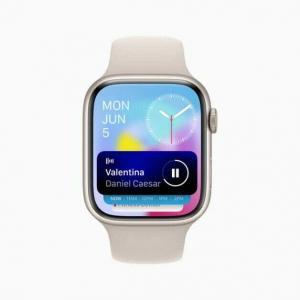
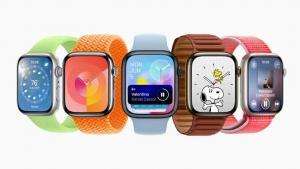
Five Apple Watch devices show features in watchOS 10, including a new Smart Stack and two additional watch faces.  

With watchOS 10, Apple introduced a number of headline new features like redesigned apps, new watch faces, new Smart Stack, and more. But it also made a number of smaller yet notable changes and additions that make your Apple Watch more functional and convenient to use.

In this article, we’ve listed 10 best hidden watchOS 10 features and enhancements, some of which may have gone under your radar. Bear in mind that ‌watchOS 10‌ requires Apple Watch Series 4 or later and an iPhone running iOS 17.

Best watchOS 10 hidden features

Here are some watchOS 10 hidden features you might not have heard about.

1. Redesigned interface

With watchOS 10, redesigned apps provide more information at a glance, and there are new ways to navigate and quickly access content.

The home screen uses machine learning to show you relevant information at the right time of day. Early in the morning? You get meetings and weather information, while later on, you’ll be served other (unspecified) information, probably a traffic report or something similar. Something like a timer will jump to the top of the list when it’s active.

2. Smart Stack

A new Smart Stack contains widgets that display timely information that adapts to the user’s context and can be revealed with a simple turn of the Digital Crown from any watch face. For example, at the beginning of the day, Weather will show the forecast, or, when traveling, the Smart Stack will show boarding passes from Wallet. Calendar and Reminders will reshuffle to the top to display upcoming meetings or tasks, and apps that are running, such as Podcasts, will also move up so they are readily available. Smart Stack also enables users to enjoy a beautiful watch face, like Portraits, while still offering a way to quickly access information they care about.

Apple Watch Series 8 shows the new Smart Stack with currently playing music displayed on top.

3. Two new watch faces

New Watch Faces
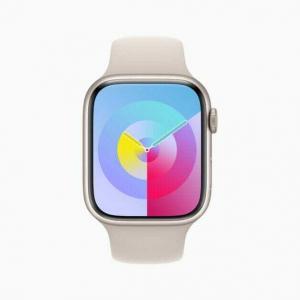
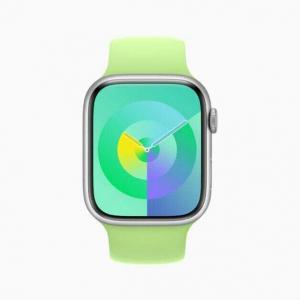
watchOS 10 introduces two new artistic and joyful watch faces: Palette and Snoopy. The Palette face depicts time in a wide variety of colors using three distinct overlapping layers, and as the time changes, the colors on the display also shift.

Apple Watch Series 8 shows the new Palette watch face in iris.

Additionally, the beloved comic strip Peanuts comes to life on Apple Watch with a new watch face featuring Snoopy and Woodstock. The characters interact and play with the watch hands, react to the weather conditions in the area, or even get active when the user does a workout.

Apple Watch Series 8 shows the new Palette watch face in emerald.

4. Cycling

Apple Watch is a great device for cyclists, with features including automatic Workout reminders, calorimetry for e-biking, and Fall Detection. watchOS 10 takes this popular activity even further with advanced new metrics, views, and experiences.

When a cycling workout is started from Apple Watch in watchOS 10, it will automatically show up as a Live Activity on iPhone and, when tapped, will utilize the full screen. Workout Views, such as Heart Rate Zones, Elevation, Race Route, Custom Workouts, and a new Cycling Speed view, have been optimized for the display size of iPhone, which can be mounted to a bike for convenient, easy viewing during a ride.

An Apple Watch user is shown riding a bicycle with Apple Watch on their wrist and iPhone mounted to the bike’s handlebars.

Apple Watch can now automatically connect to Bluetooth-enabled cycling accessories, such as power meters, speed sensors, and cadence sensors. This enables brand-new metrics, including cycling power (watts) and cadence (RPM), and additional Workout Views, including Power Zones. Bluetooth connection is supported for Indoor and Outdoor cycling workouts, as well as GymKit.

New algorithms combining sensor data from Apple Watch and connected power meters can estimate Functional Threshold Power (FTP), the highest level of cycling intensity that a rider could theoretically maintain for an hour. Using FTP, Apple Watch calculates personalized Power Zones, used to easily see the current zone and track how long is spent in each, which is an effective and popular way of improving performance.

5. Hiking

The Compass app on Apple Watch is a helpful tool for exploring the great outdoors. With watchOS 10, Compass automatically generates two new waypoints: A Last Cellular Connection Waypoint will estimate the last place with cellular reception, which may be useful for checking messages or making a call. In case of emergencies, a Last Emergency Call Waypoint will estimate where on the route their device had the last connection to any available carrier’s network so that an emergency call can be made.

When preparing routes, a new Elevation view uses altimeter data, offering a three-dimensional view of saved waypoints. And starting in the U.S., Apple Maps displays a new topographic map featuring contour lines, hill shading, elevation details, and points of interest. Users can also search for nearby trails and trailheads, with place cards that include detailed information, like trail length, type, and difficulty.

6. Mental Health monitoring

Mental health is as important as physical health, and research shows that reflecting on state of mind can help build emotional awareness and resilience. With the Mindfulness app in watchOS 10, users can discreetly and conveniently log their momentary emotions and daily moods. Users can turn the Digital Crown to scroll through engaging, multidimensional shapes to choose how they are feeling, select what is having the biggest impact on them, and describe their feelings.

In the Health app in iOS 17 and iPadOS 17, users can see valuable insights to identify what might be contributing to their state of mind — whether it’s associations or lifestyle factors, like sleep or exercise. Additionally, depression and anxiety assessments often used in clinics are now easily accessible in the Health app and can help users determine their risk level, connect to resources available in their region, and create a PDF to share with their doctor.

7. Daylight Sensitivity

Apple is concerned about children developing myopia, or near-sightedness, and says that it’s less likely to develop if children spend at least 80 minutes or more in daylight. Apple Watch can now measure the time spent outside using the ambient light sensor, and parents can monitor it in the Health app. It comes as Screen Distance is being used across other devices to help people avoid holding their iPhones and iPads too close, which can be another cause of issues while children are developing, apparently.

Time spent in daylight can provide additional benefits to physical and mental health for all ages. And children who do not have their own iPhone can use Family Setup to pair their Apple Watch to their parent’s iPhone, giving parents visibility into the amount of time their kids are spending in daylight with Health Sharing.

The new Screen Distance feature uses the same TrueDepth camera that powers Face ID in iPad and iPhone to encourage users to move their device farther away after holding it closer than 12 inches for an extended period of time.

When a device is locked with a passcode, Touch ID, or Face ID, all Health app data, including mental health and vision health data, is encrypted.

8. Widgets

Apple has revamped and improved its old Glances system into all-new widgets, which sit at the forefront of the watchOS 10 design ethos. The aim is to allow you to open up your watch and use it instantly by scrolling through your favorite widgets with the Digital Crown rather than picking through the polka-dot Where’s Waldo? cloud of apps.

Widgets enable you to access some of your most-often functionalities such as weather (which got a big redesign), workout metrics, stock tickers, timers and more. The timer, for example, can be activated via the Complications widget with a simple press of the crown, and then you can check the timer simply by scrolling up from your watch face.

9. Enterprise

Apple Watch offers enterprise customers features to enhance productivity and safety in the office or in the field, such as hands-free communication and responding to notifications on the go, or Fall Detection on a job site. watchOS 10 introduces support for Mobile Device Management (MDM), enabling enterprise customers to remotely and centrally install apps and configure accounts on a fleet of devices, with features such as passcode enforcement, and configuring Wi-Fi and VPN settings. With this update, Apple Watch can further help improve employee wellness, productivity and health, and safety monitoring.

10. APIs for Workout App Developers

watchOS 10 includes new APIs for workout app developers that will allow them to create compelling new experiences. The powerful motion sensors on both Apple Watch Series 8 and Apple Watch Ultra can detect rapid changes in velocity and acceleration, such as when swinging a golf club or a tennis racket. Now, developers will have access to this high-frequency motion data, so apps like SwingVision can analyze serve pronation, which is the twisting motion of the forearm, wrist, and hand, and Golfshot can detect small wrist movements to refine a golf swing.

watchOS 10 supported devices

The big news here is that Apple is dropping support for the Apple Watch Series 3. The 2018 model will no longer get updates and will miss out on watchOS 10. If you have an Apple Watch Series 4 or above paired with iPhone Xs or later, you are eligible for the update.

Here’s a list of Apple Watch models that are compatible with watchOS 10:

  • Apple Watch Series 4
  • Apple Watch Series 5
  • Apple Watch SE (Both models)
  • Apple Watch Series 6
  • Apple Watch Series 7
  • Apple Watch Series 8
  • Apple Watch Ultra

Enjoy All the New watchOS 10 Features

While not getting a lot of attention, these lesser-known improvements in watchOS 10 continue to make the experience even better.

Whether you’re using widgets, Watch Faces, enjoying cycling features, or something else, Apple Watch is a great way to enjoy the Apple experience on a wearable device.

So, you’re walking down the street, and you spot a white, shiny object on the ground. Upon closer inspection, you realize that it’s a pair of AirPods! Your heart races with excitement as you consider the possibilities.

You approach the earbuds cautiously, eyeing them with a mix of curiosity and suspicion. Are they broken? Are they lost? Are they just a cleverly disguised trap, waiting to ensnare the unwary?

There are many related questions you may have, including:

  • Can I contact the AirPods’ owner?
  • Can the owner see the AirPods location?
  • Can I reset the AirPods and use them?

In this article, we’ll explore what to do if you find a pair of AirPods, including whether you can contact the owner, whether the owner can see the AirPods’ location, and whether you can reset the AirPods and use them yourself.

Found AirPods

Can I contact the AirPods’ owner?

The good news is that it’s possible to contact the owner of lost AirPods, as long as they’ve set up the Find My app on their iPhone or other Apple device. The Find My app allows you to track the location of your Apple devices, including AirPods, and even play a sound to help you locate them if they’re lost.

If you are using an iPhone:

  • When your iPhone gets near the AirPods (assuming they are charged), a message should show up on your phone. It usually will just display the name of the AirPods and that they are not yours. However, someone may have decided to use their AirPods name, usually something like Dave’s AirPods, to instead give more information, such as a phone or email.
  • Many of the AirPods models can be put into Lost Mode (AirPods (3rd gen), AirPods Pro (1st and 2nd gen), AirPods Max). When this happens, a message should appear on a nearby iPhone. The Lost Mode message should contain contact info.

To see if the owner has set up Find My, simply open the AirPods case and check if they’re connected to an iPhone or other Apple device. If they are, you can try to use the Find My app to locate the owner. Here’s how:

  1. Open the Find My app on your own iPhone or other Apple device.
  2. Tap on the Items tab at the bottom of the screen.
  3. Scroll to the bottom of the Items list and tap Identify Found Item and check if there is any information on the AirPods.

If you’re able to locate the owner using the Find My app, you can try to contact them and let them know you’ve found their AirPods.

Can the owner see the AirPods location?

If the owner has enabled the "Find My" feature on their iPhone, they can see the location of their lost AirPods on a map in the Find My app. This can be a useful tool for locating lost AirPods, especially if they were misplaced in a large area like a park or shopping mall.

  • Someone who has lost their AirPods and is using Find My should be able to at least see the last known location.

  • For AirPods Pro (2nd gen): The charging case can also be located if it is separated from the AirPods.

  • For AirPods (3rd gen), AirPods Pro (1st and 2nd gen), AirPods Max:
    • They may be able to be located even if their iPhone isn’t connected to Wi-Fi or cellular.
    • The owner can get a "left behind" alert soon after separating from them.
    • The AirPods can use the Find My network. This means the AirPods can ping off of nearby Apple Devices to transmit their location to the owner.
    • The AirPods can be put into Lost Mode. This means if someone finds the AirPods, a message will appear on their iPhone. This message can contain an email or phone number.

However, there are some limitations to the "Find My" feature when it comes to AirPods. First, the AirPods must be within Bluetooth range of an iPhone or other Apple device in order to show up on the map. If the AirPods are out of range, their last known location will be shown instead.

Second, the location accuracy can vary depending on a number of factors, such as the strength of the Bluetooth signal and whether the AirPods are in their case or not. In some cases, the location may be accurate within a few feet, while in others it may be off by several yards.

Can I reset the AirPods and use them?

Now, let’s say you’ve exhausted all your options for finding the owner of the lost AirPods, and you’re left with a dilemma: can you keep them and use them as your own? Technically, yes, you can reset the AirPods and pair them with your own iPhone or iPad. However, doing so could be considered unethical and potentially illegal, depending on the circumstances.

First and foremost, if you find a pair of lost AirPods, the right thing to do is to try and return them to their owner. Imagine if you lost a valuable item like AirPods – wouldn’t you want someone to make an effort to return them to you? By keeping the lost AirPods and using them as your own, you’re depriving the owner of their property and potentially causing them financial loss.

Furthermore, if you find lost property and don’t make a reasonable effort to return it to the owner, you could be charged with theft or larceny. The laws regarding lost property vary by jurisdiction, but in general, if you find lost property and don’t make a good faith effort to return it to the owner, you could be charged with theft.

That being said, there are some situations where keeping the lost AirPods may be more reasonable. For example, if you found the AirPods in a public place with no identifying information, and you’ve made a reasonable effort to find the owner with no success, it may be more justifiable to keep them.

If you do decide to keep the lost AirPods, you should still be cautious about resetting and pairing them with your own device. Resetting the AirPods will erase any data stored on them, including the owner’s settings and preferences.

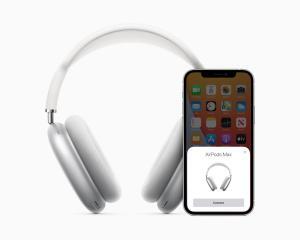
AirPods Max paired up with iPhone 12.  
Dave Johnson/GeeksModo

Please note: for AirPods (3rd gen), AirPods Pro (1st and 2nd gen), or AirPods Max, the AirPods need to be removed from the owner’s Apple ID before they can be added to a new owner’s Apple ID. This also removes the Find My Lock. This must be done by the AirPods’ owner.

To reset the AirPods, follow these steps:

  1. Put both AirPods in their case and close the lid.

  2. Wait at least 15 seconds.

  3. Press and hold the button on the back of the case until the LED light on the front starts flashing white.

  4. Release the button and wait for the LED light to turn amber.

  5. Open the lid of the case and bring it close to your device.

  6. Follow the instructions on your device’s screen to pair the AirPods with your device.

Keep in mind that resetting the AirPods will erase any data stored on them, such as custom settings and pairing information. Additionally, if the AirPods are linked to an Apple ID, they may be locked and unable to be reset without the owner’s permission.

Conclusion

If you find a pair of lost AirPods, your first course of action should be to try to contact the owner and arrange to return them. If you are unable to do so, you can open the "Find My" feature on your own Apple device to Identify Found Item and see if there is any information on the AirPods and help facilitate their return. Resetting the AirPods and using them without attempting to return them to the owner first is not ethical and could be considered stealing. Remember, the right thing to do is to always try to return lost items to their rightful owner.

Apple and Samsung are two of the biggest players in the tech industry. While they are rivals in many ways, it may surprise some to know that Apple uses Samsung parts in many of their products. In fact, Samsung is one of the main suppliers of components for Apple devices, including the iPhone and iPad. So why does Apple rely on Samsung, a company that is often viewed as a competitor, for essential parts? In this article, we’ll explore the reasons behind this decision.

First, it’s important to understand that Samsung is one of the largest manufacturers of electronic components in the world. They produce a wide range of components, including memory chips, processors, displays, and batteries. Their production capacity is massive, and they have the ability to produce high-quality components at a large scale. This makes them an attractive supplier for many tech companies, including Apple.

One of the main reasons why Apple uses Samsung parts is simply because they are the best available. Samsung is known for producing high-quality components that are reliable and efficient. Apple is known for being extremely selective about the components they use in their devices, and they are willing to pay a premium for the best quality. Samsung has a reputation for producing some of the best components in the industry, so it makes sense that Apple would want to use their parts.

Another reason why Apple uses Samsung parts is because of their long-standing relationship. Despite being competitors in many ways, Apple and Samsung have a long history of working together. In fact, Samsung has been a major supplier of components for Apple since the early days of the iPhone. Over the years, the two companies have developed a close working relationship that has helped them both to succeed. They have a deep understanding of each other’s strengths and weaknesses, and they work together to create the best possible products.

In addition to their close relationship, Samsung is also one of the few companies that has the ability to produce the high-quality components that Apple requires. Apple is known for being extremely demanding when it comes to the quality of the components they use in their devices. They require components that are not only reliable and efficient, but also meet strict environmental and social responsibility standards. Samsung has the production capacity, technology, and expertise to meet these demands, which makes them a valuable supplier for Apple.

Another factor that makes Samsung an attractive supplier for Apple is their vertical integration. Samsung is not just a component manufacturer, but also a producer of finished products. This means that they have a deep understanding of how components work together to create a final product. They are able to optimize their components to work seamlessly with other components in a device, which can result in better performance and reliability. This is particularly important for Apple, which is known for producing tightly integrated devices that are optimized for performance and efficiency.

It’s also worth noting that Samsung is a major player in the smartphone market, which is one of Apple’s biggest markets. While they may be competitors in this space, Samsung has a deep understanding of the smartphone market that can be valuable to Apple. They have insights into consumer preferences, emerging technologies, and market trends that can help Apple to stay ahead of the curve. By working closely with Samsung, Apple can gain access to these insights and use them to create better products.

In addition, Apple’s partnership with Samsung allows the company to access cutting-edge technology that it might not be able to develop on its own. Samsung invests heavily in research and development, and the company has been at the forefront of developing new technologies for smartphones. For example, Samsung was the first company to produce a foldable smartphone, and the company’s Exynos processors are some of the most advanced on the market. By partnering with Samsung, Apple can access these technologies and incorporate them into its own products.

Moreover, Samsung is one of the few companies that can produce the volume of components Apple needs. Apple sells millions of iPhones every year, and the company needs a reliable supplier that can provide components in large quantities. Samsung is one of the few companies that can meet Apple’s demand for parts. In fact, Samsung is the world’s largest manufacturer of memory chips, which are used in a wide range of devices, including smartphones, laptops, and servers. By partnering with Samsung, Apple can ensure that it has a steady supply of components to meet its production needs.

It’s worth noting that Apple does not rely solely on Samsung for their components. They also use components from other suppliers, including LG, Toshiba, and Sharp. This helps to ensure that they are not too reliant on any one supplier, and it gives them access to a wider range of components and technologies.

It’s important to remember that Apple is a business, and their decisions are ultimately driven by financial considerations. While they are willing to pay a premium for high-quality components, they are also looking for suppliers that can provide them with the best value. Samsung is able to provide Apple with high-quality components at a competitive price, which makes them an attractive supplier. By using Samsung parts, Apple can keep their costs down while still producing high-quality devices that meet the demands of their customers.

However, the relationship between Apple and Samsung is not without its challenges. The two companies have been involved in several legal battles over the years, with Apple accusing Samsung of copying its designs and infringing on its patents. In 2018, the two companies settled a longstanding legal dispute over alleged patent infringement, with Samsung agreeing to pay Apple $539 million. Despite these legal battles, however, the two companies continue to do business with one another.

Another potential issue is the risk of Samsung using its position as a supplier to gain an advantage over Apple. Samsung has been accused of this in the past, with some analysts speculating that the company may use its access to Apple’s designs and technologies to inform its own products. However, there is no evidence to suggest that Samsung has done this, and Apple likely has measures in place to protect its intellectual property.

In conclusion, while it may seem strange that Apple, a company that is often viewed as a competitor of Samsung, relies on Samsung for many of their components, there are actually many good reasons for this decision. Samsung is a high-quality component supplier with a long-standing relationship with Apple, production capacity and expertise that meet Apple’s demanding standards, vertical integration that allows for better optimization, insights into the smartphone market that can be valuable to Apple, and competitive pricing that helps to keep Apple’s costs down. While there are potential risks associated with this relationship, it seems that the benefits outweigh the potential downsides. Ultimately, the decision to use Samsung parts is just one of many strategic decisions that Apple makes in order to create the best possible products for their customers.

In recent years, it has become increasingly evident that iPhones are much cheaper in China than in other parts of the world. The price difference has sparked much speculation and debate, with some people attributing the lower cost to China’s large market share, while others suggest that it is due to the lower labor and production costs in China. In this article, we will explore the various reasons why iPhones are cheaper in China.

First and foremost, it is important to note that Apple’s pricing strategy for its products varies from country to country. The company takes into account a variety of factors when determining the pricing for its products, including currency exchange rates, local taxes and tariffs, shipping costs, and more. This means that the price of an iPhone in China may not necessarily reflect the price of the same iPhone in other parts of the world.

One of the primary reasons why iPhones are cheaper in China is because of the local competition. The Chinese smartphone market is highly competitive, with numerous brands vying for a share of the market. This has led to intense price competition, with many smartphone brands offering devices at lower prices than Apple. To remain competitive, Apple has had to lower its prices in China, making its devices more affordable for Chinese consumers.

Another reason why iPhones are cheaper in China is due to the lower labor and production costs in the country. China has a large pool of skilled labor, which allows Apple to manufacture its devices at a lower cost. Additionally, China offers significant tax breaks and subsidies to foreign companies that invest in the country. These incentives have allowed Apple to establish a significant manufacturing presence in China, which has helped to drive down the cost of production.

It is also worth noting that Apple has made a concerted effort to increase its sales in China in recent years. China is a massive market, and Apple has recognized the potential for growth in the country. To capitalize on this, the company has invested heavily in marketing and advertising campaigns in China, as well as in the development of Chinese-specific features for its devices. By increasing its sales volume in China, Apple has been able to lower the cost of its devices, making them more affordable for Chinese consumers.

Finally, it is worth noting that there are some restrictions on the import of foreign electronics into China. These restrictions can make it difficult for foreign companies to sell their products in China, and can drive up the cost of imported goods. However, Apple has been able to navigate these restrictions and establish a strong presence in the Chinese market, which has helped to keep the cost of its devices lower than in other parts of the world.

In conclusion, there are several reasons why iPhones are cheaper in China. These include local competition, lower labor and production costs, Apple’s investment in the Chinese market, and restrictions on the import of foreign electronics. While the exact pricing strategy for Apple’s products may vary from country to country, it is clear that the company has recognized the importance of the Chinese market, and has taken steps to make its devices more affordable for Chinese consumers.

Apple is a brand that is widely known for its sleek design, user-friendly interfaces, and premium pricing. While many people are willing to pay a premium for Apple’s products, the cost of repairs can often come as a shock to users. Apple repairs can be notoriously expensive, sometimes costing more than the device itself. In this article, we will explore why Apple repairs are so expensive and what factors contribute to their high costs.

1. Proprietary Parts and Tools

Apple designs its devices to be unique, both in terms of hardware and software. This means that when it comes to repairs, Apple uses proprietary parts and tools that are only available through Apple itself or its authorized service providers. This exclusivity ensures that only trained professionals with Apple-approved tools can repair your device, which can drive up the cost of repairs. Additionally, Apple’s proprietary parts are often more expensive than third-party alternatives due to their higher quality and more rigorous testing standards.

2. Skilled Labor

Apple devices are notoriously difficult to repair, and this is partly due to their design. Apple prioritizes aesthetics and slimness, which means that many components are tightly packed and hard to access. To repair an Apple device properly, a skilled technician is required, which can be costly. Apple’s training programs for technicians are rigorous and comprehensive, and as a result, Apple charges a premium for their expertise.

3. High Quality Standards

Apple has a reputation for producing high-quality devices, and this extends to their repair services. Apple ensures that all repairs are done to the highest possible standards, which means that repairs can be time-consuming and require multiple checks and tests to ensure that the device is functioning correctly. This rigorous quality control process adds to the overall cost of repairs.

4. Limited Competition

Apple’s exclusive control over its parts and repair services means that there is limited competition in the market. This lack of competition can drive up prices as customers have few other options for repairs.

5. Brand Premium

Apple is known for its premium pricing and high-end products, which means that customers may be willing to pay more for Apple repairs. The perception that Apple is a premium brand can drive up prices for repairs, as customers may be willing to pay more for repairs that are performed by Apple or authorized service providers.

6. Warranty and AppleCare

Apple’s warranty and AppleCare programs can also contribute to the overall cost of repairs. While Apple’s warranty covers manufacturing defects, it does not cover accidental damage or user-inflicted damage. AppleCare is an extended warranty program that covers accidental damage, but it comes at a premium price. These programs can increase the overall cost of repairs and may lead some users to opt for third-party repair services instead.

7. Environmental Regulations

Apple is committed to reducing its environmental impact, which means that the company has to adhere to strict regulations when it comes to recycling and disposal of electronic waste. These regulations can add to the cost of repairs, as Apple has to ensure that any damaged or broken components are recycled or disposed of in an environmentally friendly manner. This requires specialized equipment and processes that can be expensive to implement.

8. Complexity of Repairs

Apple devices are becoming increasingly complex, with more features and components packed into a smaller space. This complexity can make repairs more difficult and time-consuming, which drives up the cost. For example, the latest iPhone models have multiple cameras, Face ID sensors, and other high-tech components that require skilled technicians and specialized tools to repair.

9. Research and Development

Apple invests heavily in research and development to create innovative products and services. This investment is reflected in the price of Apple devices and services, including repairs. Apple needs to recoup its R&D costs and ensure that it can continue to innovate, which means that it charges a premium for its products and services.

10. Intentional Obsolescence

Apple’s business model is based on releasing new products and encouraging customers to upgrade to the latest models. This means that Apple may intentionally design products to become obsolete or difficult to repair over time, in order to encourage customers to upgrade to newer models. This intentional obsolescence can make repairs more expensive, as older devices may require more specialized parts and labor to repair.

Conclusion

Apple repairs are expensive due to a combination of factors. Apple’s proprietary parts and tools, skilled labor, high quality standards, limited competition, warranty programs all contribute to the overall cost. While Apple’s premium pricing may be justified for some users who prioritize design and performance, the cost of repairs can be prohibitive for many. It is important for users to consider the potential cost of repairs before purchasing an Apple device and to explore all available repair options.

Apple products have long been a popular choice for consumers due to their high quality, sleek design, and user-friendly features. However, it is not uncommon for people to notice that Apple products are often cheaper on Amazon compared to buying them directly from Apple or other retailers. This raises the question: why are Apple products cheaper on Amazon? Here are some possible explanations:

1. Third-party Sellers

One reason why Apple products are cheaper on Amazon is due to the presence of third-party sellers. These third-party sellers may have purchased the Apple products in bulk, which can lead to lower prices due to discounts offered by Apple for bulk purchases. Additionally, some third-party sellers may be selling refurbished or used Apple products, which can be sold at a lower price compared to new products.

2. Amazon’s Prizing Algorithms

Another reason why Apple products may be cheaper on Amazon is due to Amazon’s pricing algorithm. Amazon uses an algorithm to set prices for products on its platform, and this algorithm takes into account factors such as supply and demand, competitor prices, and historical data. This can result in lower prices for Apple products if they are in high demand or if there are a lot of competitors selling similar products. Amazon’s pricing algorithm is constantly updated to ensure that prices are competitive and attractive to customers, which can lead to lower prices for Apple products on Amazon.

3. Reduced Overhead Costs

Amazon also has lower overhead costs compared to traditional brick-and-mortar retailers, which can allow the company to offer lower prices for products. Amazon doesn’t have the same expenses as traditional retailers, such as rent, utilities, and employee salaries. This can allow Amazon to offer lower prices for products, including Apple products.

4. Limited Selection

Another factor that can lead to lower prices for Apple products on Amazon is the limited selection of products. While Amazon does offer a wide variety of Apple products, the selection may not be as comprehensive as buying directly from Apple or other retailers. This limited selection can sometimes result in lower prices for the products that are available on Amazon.

5. Bundled Deals

Amazon sometimes offers bundled deals on Apple products, which can result in lower prices overall. For example, customers may be able to purchase an Apple product along with accessories or other products at a lower price than if they were to buy them separately. These bundled deals can make Apple products more affordable for customers who may be on a budget.

6. Amazon’s partnership with Apple

Amazon has a partnership with Apple, which allows the company to sell new Apple products directly on its platform. This means that Amazon is an authorized reseller of Apple products, which can result in lower prices compared to buying from other retailers. The partnership also means that Amazon can offer exclusive deals and promotions on Apple products, which can make them more affordable for customers.

7. Sales tax

Sales tax can vary depending on the state you live in, and some states may have lower sales tax rates compared to others. If you live in a state with a lower sales tax rate, you may be able to purchase Apple products on Amazon at a lower price compared to buying directly from Apple or other retailers. This can be especially beneficial for customers who are purchasing expensive Apple products, as the savings can be significant.

8. Seasonal discounts

Amazon often offers seasonal discounts and promotions on Apple products, especially during major shopping events like Black Friday and Cyber Monday. These discounts can result in significant savings for customers who are looking to purchase Apple products, and they can be a great way to get a good deal on a new iPhone, iPad, or MacBook.

9. International shipping

Amazon has a global reach, which means that customers from around the world can purchase Apple products on its platform. This can be especially beneficial for customers who live in countries where Apple products may not be available, or where they may be more expensive due to taxes or import fees. By purchasing Apple products on Amazon and using international shipping, customers may be able to save money and still get their hands on the latest Apple products.

10. Competition Among Sellers

One more compelling reason why Apple products may be cheaper on Amazon is due to the competition between different sellers on the platform. Amazon has a vast number of sellers, including both third-party sellers and Amazon’s own retail operations, all competing to sell Apple products. This competition can lead to lower prices, as sellers may need to lower their prices to attract customers and remain competitive. The competition among sellers can be especially fierce for popular Apple products like iPhones and iPads, where there is a high demand from customers. This can result in lower prices for Apple products on Amazon compared to buying directly from Apple or other retailers. Customers can take advantage of this competition by shopping around and comparing prices from different sellers on Amazon to find the best deal possible.

Conclusion

There are several reasons why Apple products may be cheaper on Amazon, including the presence of third-party sellers, Amazon’s pricing algorithm, reduced overhead costs, limited selection, bundled deals, Amazon’s partnership with Apple, sales tax, seasonal discounts, international shipping, and competition among sellers. These factors can result in lower prices for Apple products on Amazon compared to buying directly from Apple or other retailers. However, customers should always compare prices and do their research before making a purchase to ensure that they are getting the best deal possible.

Apple Inc. is a technology company that has revolutionized the way we communicate, work, and live. Since its founding in 1976, Apple has consistently been at the forefront of innovation, creating products that are not only technologically advanced but also visually stunning and easy to use. From the Macintosh to the iPhone, the company has changed the world with its innovative products. In this article, we will explore main reasons why Apple is so successful.

1. Customer Focus

Apple places a strong emphasis on customer experience, and it shows in its products and services. The company is known for its exceptional customer service and support, which has helped to build a loyal customer base. Apple understands that happy customers are the key to its success, and it works hard to ensure that its customers are satisfied.

2. Innovative Products

Apple’s success can be attributed to its ability to create innovative and user-friendly products. The company’s design philosophy is based on simplicity, elegance, and functionality. Apple’s products are not just aesthetically pleasing; they are also intuitive and easy to use. This approach has won over millions of customers who appreciate the company’s attention to detail and dedication to user experience. Apple has always been committed to pushing the limits of what technology can do and creating products that are ahead of their time.

3. Marketing Strategies

Apple’s marketing strategies are another reason for the company’s success. The company’s advertising campaigns are always creative and innovative, generating significant buzz and anticipation for its products. Apple’s branding is also highly recognizable, with its iconic logo and sleek designs.

The company’s marketing strategies have also been highly effective in creating a sense of exclusivity around its products. Apple releases new products in limited quantities, creating a sense of urgency among consumers. This approach has helped Apple maintain high profit margins and avoid price wars with its competitors.

4. Strong Leadership

Apple’s strong leadership is another reason for the company’s success. The late Steve Jobs was a visionary leader who was highly influential in shaping Apple’s product lineup and marketing strategies. His ability to inspire and motivate his team was critical in the company’s success.

Apple’s current CEO, Tim Cook, has continued Jobs’ legacy of innovation and product design. Cook has also focused on expanding Apple’s services division, which includes Apple Music, Apple Pay, and the App Store. This approach has helped diversify Apple’s revenue streams and reduce its reliance on hardware sales.

5. Brand Loyalty

Apple’s brand loyalty is another factor contributing to its success. The company has cultivated a devoted fan base that is willing to pay a premium for its products. Apple’s focus on user experience, innovative design, and marketing strategies have created a sense of exclusivity around its products, making them highly desirable.

6. Supply Chain Management

Apple’s supply chain management is another factor contributing to its success. The company has a highly efficient supply chain that enables it to produce and distribute its products quickly and at a low cost. Apple’s supply chain management has also enabled the company to maintain high profit margins while keeping prices competitive.

7. Strategic Partnerships

Apple’s strategic partnerships have helped the company expand its reach and bring new products to market. Apple has partnered with a range of companies, including Nike, Disney, and IBM, to create innovative products and services. These partnerships have allowed Apple to leverage the strengths of other companies and create new opportunities for growth.

8. Strong Financial Position

Apple’s strong financial position has allowed the company to invest heavily in research and development, marketing, and strategic acquisitions. This has helped to keep the company at the forefront of innovation and maintain its competitive edge. Apple’s financial position has also allowed it to weather economic downturns and come out stronger on the other side.

9. Ecosystem of Products

Apple has built an ecosystem of products that work seamlessly together. From Mac computers to iPhones, iPads, and Apple Watches, Apple products can easily sync and work together, making the user experience more convenient and enjoyable. Users can easily share data, files, and information between their devices and access a range of services using a single Apple ID. This seamless integration has made it easier for users to switch to new devices within the ecosystem.This ecosystem has helped to create a strong sense of loyalty among Apple customers.

10. Vertical Integration

Apple’s vertical integration strategy has been key to its success. The company designs and manufactures its own hardware and software, giving it more control over the user experience. This control has allowed Apple to create products that are more reliable, secure, and easy to use.

11. Focus on Privacy

Apple has made privacy a top priority, which has helped to build trust with customers. The company has implemented strong security measures to protect user data, and its products are designed to give users more control over their privacy. Apple’s commitment to privacy has differentiated it from its competitors and has helped to create a strong sense of trust among its customers.

Conclusion

Apple’s success can be attributed to several factors, including branding, innovation, marketing strategies, strong leadership, brand loyalty, strategic partnership, and supply chain management. Apple’s commitment to user experience, attention to detail, and focus on quality have made its products highly desirable, even to consumers who may not be tech-savvy. The company’s ability to stay ahead of its competitors and create new markets has enabled it to maintain its position as one of the most successful companies in the world.

Apple is a company that is well-known for producing high-quality products, and their accessories are no exception. One accessory that consumers often find surprisingly expensive is the Apple cable. While there are many third-party cable options available at a lower price point, Apple cables remain popular and highly sought after. In this article, we will explore ten reasons why Apple cables are so expensive.

1. High-Quality Materials

Apple cables are made using high-quality materials, such as braided nylon, which is durable and resistant to wear and tear. These materials ensure that the cables last longer and do not need to be replaced as often.

2. Rigorous Testing

Apple cables undergo rigorous testing to ensure they meet Apple’s high standards for quality and durability. They are tested for strength, durability, and resistance to wear and tear to ensure it can withstand daily use. This testing process ensures that only the best quality cables make it to the market.

3. MFi Certification

Apple cables are MFi (Made for iPhone/iPad/iPod) certified, which means they meet the requirements set by Apple to ensure they work seamlessly with Apple devices. This certification guarantees that the cables are of high quality and provide the best performance. The MFi certification ensures that Apple cables are compatible with the latest versions of iOS and Apple devices.

4. Compatibility

Apple cables are designed to work seamlessly with Apple devices, providing the best performance and compatibility. Apple designs its cables to be compatible with the latest devices and iOS versions, ensuring that they continue to work even after system updates.

5. Brand Reputation

Apple is a premium brand, and their products come with a premium price tag. The company’s reputation for quality and innovation means that consumers are willing to pay more for their products, including their cables. Apple’s brand reputation ensures that their cables are perceived as premium products, which justifies their high price tag.

6. Warranty

Apple cables come with a one-year warranty, providing consumers with peace of mind that their investment is protected. If the cable fails within the warranty period, Apple will replace it at no cost. This warranty is an added value that justifies the high price of Apple cables.

7. Design

Apple cables are designed to be stylish and complement the overall aesthetic of Apple products. The design ensures that the cables are easy to use and plug in. The design also ensures that the cables are compact and easy to store, making them more convenient for users.

8. Accessibility

Apple cables are designed with accessibility in mind, making them easy to use and providing easy access to all ports and buttons. They are compatible with various charging accessories, such as wall adapters, car chargers, and power banks. This accessibility ensures that Apple cables are convenient to use, making them a preferred choice for many consumers.

9. Durability

Apple cables are designed to be durable and resistant to wear and tear. They have reinforced connectors and are built to withstand twisting and bending, which can cause cheaper cables to break. This durability ensures that Apple cables last longer than cheaper alternatives, making them a better investment in the long run.

10. Innovation

Apple is known for its innovation, and this is reflected in its cables. For example, the company has developed the Lightning connector, which is smaller and more durable than the previous connector. This innovation ensures that Apple cables are at the forefront of cable technology, providing users with the best performance and user experience.

Conclusion

Apple cables are expensive for a variety of reasons, including high-quality materials, rigorous testing, MFi certification, compatibility, brand reputation, warranty, design, accessibility, durability, and innovation. While there are cheaper third-party cable options available, those looking for the best quality, performance, and design will find that the premium price of Apple cables is worth it.